סוכן חיפוש עבודה (MCP)
סוכן AI שעוזר לי לחפש עבודה בלינקדאין, דרך שרת MCP עם 20 כלים. הוא יכול לחפש משרות ולקרוא אותן, אבל כל פעולה אמיתית בחשבון מחכה שאאשר אותה בעצמי בטרמינל עם קוד חד פעמי. את זה אוכף מבנה הקוד, לא הוראות לסוכן. 199 בדיקות ו־13 מסמכי החלטה. ניסוי אישי שהרצתי רק על החשבון שלי.
- TypeScript
- Node.js
- MCP
- Playwright
- SQLite
- Vitest
linkedin-agent-mcp
[!WARNING]
Experimental project. Use entirely at your own risk.This is a personal engineering experiment in agent safety design (typed tools, out-of-band human confirmation, failure-honest errors). It is published to show the code, not as a product or a recommendation to automate LinkedIn.
- How I have used it: only on my own account, a handful of times, with me watching: read-only checks (search, a job page, my own profile, my saved jobs) and a single save/unsave of one posting to verify the confirmation flow. I have never used it to scrape data, send messages or connection requests, apply to jobs, or run anything in bulk or unattended.
- LinkedIn's terms: LinkedIn's User Agreement (§8.2) prohibits bots and other automated access, and this project drives a real browser on a real account. Running it may get your account restricted or banned.
- Your responsibility: anyone who runs this code does so at their own risk and is solely responsible for complying with LinkedIn's terms and applicable law. The software is provided "as is", without warranty of any kind (see LICENSE), and the author accepts no liability for how it is used.
A personal, human-in-the-loop LinkedIn job-search agent, exposed as an MCP server so an MCP client such as Claude Code can search jobs, read postings and your profile, track what you have seen, and prepare actions, while every consequential step on LinkedIn requires your explicit confirmation, given out-of-band in your own terminal.
It is deliberately not a mass-automation or scraping system: one browser page at a time, small capped result sets, spaced navigation, an hourly cap on external actions, and no evasion techniques of any kind.
At a glance
- What it is: a TypeScript (Node 24) MCP server with 20 typed tools that let an AI agent search jobs, read postings and your profile, track what you have seen, and prepare actions on your own LinkedIn account.
- Ports and adapters: the MCP layer is thin (zod schemas + error mapping); services depend on a
LinkedInClientinterface and repository interfaces, so Playwright lives in exactly two files and SQLite sits behind swappable repositories. - READ / PREPARE / EXECUTE, enforced structurally: each tool group is handed only the ports it may use, so a READ or PREPARE tool cannot reach the executor, not by prompt instructions but by construction.
- Out-of-band confirmation: there is no
confirmtool. Every external action needs a human to runnpm run confirmin a real terminal and type a code; the payload is SHA-256 bound to that approval, single-use (database compare-and-swap), and time-limited. - Failure-honest: ambiguous writes become
OUTCOME_UNKNOWNand are never auto-retried; LinkedIn markup changes surface as a typedLINKEDIN_CHANGED, never as made-up data; the audit log is append-only via database triggers. - Tested: 199 vitest tests (parsers on captured/modelled fixtures, state machines, the whole confirmation workflow including tampering and races, and a spawned stdio server through the real MCP SDK client), plus an opt-in read-only E2E suite run against a real account.
- Documented decisions: 13 ADRs in docs/decisions/.
Status (2026-09-23): read-only flows (auth, search, job detail, own profile, saved jobs) are verified live on a real signed-in account, and so is the one registered write, Save/Unsave, run once end to end through the terminal confirmation with the owner present. Easy Apply, messaging, connections and profile writes are not implemented yet. Details in Verification status and CLAUDE.md.
Read this first: ToS and status. LinkedIn's User Agreement (§8.2) prohibits bots and other automated access. There is no official LinkedIn API for job search, saved jobs or applications for job seekers (see LinkedIn API limitations). This project drives a real browser on your own account. That is a risk to your account that only you can accept, and the browser will not start until you have (
npm run login). Also see Verification status: parts are verified live, parts are only unit-tested.
Contents
Architecture · Why MCP · Stack · READ / PREPARE / EXECUTE · Security model · Install · Authentication · Configuration · Claude Code · Tools · Confirmation · Application workflow · Persistence · Testing · Verification status · Limitations · Roadmap · Responsible use · Decision log
Architecture
flowchart TB
    CC["Claude Code / MCP client"] -->|"stdio JSON-RPC"| MCP["MCP server (thin: schemas, kind labels, error mapping)"]

    subgraph tools["Tool groups get only the ports they may use"]
        R["READ tools"]
        P["PREPARE tools"]
        E["EXECUTE tools (actionId only)"]
    end
    MCP --> R & P & E

    R --> JS["JobService / ProfileService"]
    P --> JS
    P --> AP["ActionPreparer"]
    E --> AX["ActionExecutor"]

    AX --> AS["ActionService<br/>state machine, hash check, CAS, audit"]
    AP --> AS
    JS --> LC["LinkedInClient (interface)"]
    AS -->|"executors"| LC

    LC --> BC["Browser client (Playwright)"]
    LC -.->|"future: official API where one exists"| API["LinkedIn API"]
    BC --> BM["BrowserManager<br/>persistent profile, 1 page, throttled, linkedin.com only"]
    BM --> LI[("linkedin.com")]

    JS & AS & AP --> REPO["Repository interfaces"] --> DB[("SQLite<br/>jobs · job_views · applications · application_answers<br/>profile_changes · messages · actions · audit_events")]

    HUMAN(["You, in a terminal"]) -->|"npm run confirm (TTY + typed code)"| CF["ConfirmationService"] --> AS
Rules the layout enforces:
- The MCP layer is thin. Tools validate input (zod), call a service, and map errors. No business logic, no SQL, no Playwright.
- Services depend on interfaces.
LinkedInClienthides how LinkedIn is reached; repositories hide where state lives. - Only two files import Playwright:
src/browser/browser-manager.ts(site-agnostic) andsrc/linkedin/browser-client.ts(LinkedIn-specific). All DOM knowledge is insrc/linkedin/selectors.ts; parsing is pure functions insrc/linkedin/parsers/. - The confirmation port is not reachable from MCP. See Confirmation workflow.
src/
  index.ts  server.ts  container.ts  config.ts  logger.ts  consent.ts  state-machine.ts
  browser/      browser-manager.ts               persistent context, serialization, throttling, allowlist
  linkedin/     linkedin-client.ts (interface) browser-client.ts session.ts url.ts selectors.ts types.ts
                parsers/ (search, job, profile, dom)
  jobs/ profile/ messaging/ applications/ actions/   services + state machines
  persistence/  database.ts migrations.ts repositories/
  tools/        define.ts schemas.ts views.ts  read/ prepare/ execute/
  cli/          login.ts confirm.ts
  errors/       errors.ts
docs/decisions/ 13 ADRs + index + template        scripts/decisions.mjs
tests/ fixtures/
Why MCP
MCP gives an agent typed, discoverable tools over a standard protocol, so the same server works with Claude Code today and other clients later. It also gives a natural place to put the safety model: the tool surface (what exists, what each accepts) is part of the security boundary. There is no confirm tool, and execute tools accept only an actionId.
Why this technology stack
| Layer | Choice | Why (details in the ADR) |
|---|---|---|
| Language/runtime | TypeScript on Node 24, run directly via native type stripping | MCP SDK and Playwright are TypeScript-first; no loader dependency (ADR-0001) |
| MCP | @modelcontextprotocol/server v2, stdio |
Current stable line; local transport; no network surface (ADR-0003) |
| Validation | zod 4 (input and output schemas) | Types vanish at runtime; SDK validates both directions |
| Browser | Playwright, persistent profile, system Chrome/Edge | Manual login, no credentials handled (ADR-0006) |
| Parsing | cheerio + pure functions | Fixture-testable without a browser (ADR-0008) |
| Persistence | node:sqlite behind repository interfaces |
No native addon; replaceable by Postgres (ADR-0005) |
| Tests | vitest + MCP SDK client (in-memory and real stdio) | (ADR-0011) |
Four runtime dependencies in total. Logging and state machines are hand-rolled on purpose.
READ / PREPARE / EXECUTE
| Kind | May do | May not do | Enforced by |
|---|---|---|---|
| READ | Read LinkedIn; write local tracking (jobs seen, views) | Change LinkedIn; create actions | READ tools are handed only read ports (ActionReader, Pick<JobService,'search'|'get'|'listTracked'>) |
| PREPARE | Write local state: drafts, PENDING actions, local job status. May read LinkedIn (e.g. current headline) |
Perform any external action | PREPARE tools are handed ActionPreparer only: no executor |
| EXECUTE | Change LinkedIn, for one confirmed action | Accept a payload from the agent; run unconfirmed/expired/altered/repeated actions | ActionExecutor.execute(actionId, type): state machine + hash binding + CAS (ADR-0007) |
This is enforced structurally (interfaces handed to each group, state machine, database), not by prompt instructions. The prompt-level guidance in the server instructions is only a courtesy on top.
Security model
Threat model: an LLM (possibly manipulated by hostile text in a job posting) acting only through MCP tools and non-interactive shell, on a machine you control. Out of scope: malware or a person with full access to your account/machine (they could edit the SQLite file or read your browser profile).
| Concern | Control |
|---|---|
| Agent performs an external action unprompted | Execute tools need a CONFIRMED action; only npm run confirm (TTY + typed code) can create one |
| Agent changes what gets executed after approval | Payload is immutable; its SHA-256 is bound to the confirmation and re-verified at execution (tested by tampering with the DB row) |
| Replay / double execution | Confirmation is single-use: CONFIRMED → EXECUTING is a database compare-and-swap; no edge back into EXECUTING; race tested |
| Stale approval | Confirmation expires (default 10 min); pending actions expire (60 min) |
| Ambiguous write outcome (browser dies mid-submit) | OUTCOME_UNKNOWN blocks any retry until a human reconciles (ADR-0007) |
| Runaway agent | Hourly cap on executed actions; 25-result cap; single serialized page; spaced navigation |
| Credential exposure | Passwords, MFA and cookies are never handled by this program: login is manual in a browser window; logs redact sensitive keys; no tool returns them; cookie values are never read (only presence of li_at) |
| Browser used elsewhere | Host allowlist: only https://*.linkedin.com may be navigated to |
| Prompt-injected data | Tool inputs are strictly validated; free text is only ever stored/previewed, never executed; LinkedIn URLs are parsed and canonicalised |
| Error leakage | Unknown errors collapse to INTERNAL_ERROR; paths, page contents and stack traces stay on stderr |
| Tampering with history | audit_events is append-only (database triggers reject UPDATE/DELETE) |
| Local secrets | Browser profile, DB and consent live under ~/.linkedin-agent-mcp/ (git-ignored). The profile directory is effectively a credential: protect it |
Defence in depth: .claude/settings.json adds Claude Code ask rules for the execute tools.
Installation
Requirements: Node.js ≥ 24, and Google Chrome or Microsoft Edge installed (or npx playwright install chromium and BROWSER_CHANNEL=chromium).
git clone <this repo> linkedin-agent-mcp && cd linkedin-agent-mcp
npm install
npm run build
npm test
Authentication
npm run login
- First run only: shows the ToS/automation notice; you must type
I UNDERSTAND. (Refuses to run without an interactive terminal.) - Opens a visible Chrome/Edge window on a dedicated profile (
~/.linkedin-agent-mcp/browser-profile). - You sign in: password, MFA, and any CAPTCHA (the program never automates or bypasses these).
- It detects the session (presence of the
li_atcookie and a non-wall page), double-checks by loading the feed, and closes the browser so the profile is saved.
Re-run when the session expires (LOGIN_REQUIRED). Check state any time with the linkedin_auth_status tool.
Configuration
Typed and validated at startup (src/config.ts); see .env.example. No LinkedIn credentials exist in configuration.
| Variable | Default | Meaning |
|---|---|---|
LINKEDIN_AGENT_HOME |
~/.linkedin-agent-mcp |
Root for all local state |
LINKEDIN_PROFILE_DIR |
<home>/browser-profile |
Browser profile |
DATABASE_PATH |
<home>/agent.db |
SQLite file |
BROWSER_HEADLESS |
true |
(npm run login is always visible) |
BROWSER_CHANNEL |
chrome |
chrome | msedge | chromium |
LOG_LEVEL |
info |
debug…silent; always stderr |
DEFAULT_MAX_RESULTS |
10 |
Hard cap is 25 |
MIN_NAVIGATION_INTERVAL_MS |
3000 |
Spacing between page loads |
CONFIRMATION_TTL_MINUTES |
10 |
Confirmation validity |
EXECUTIONS_PER_HOUR_LIMIT |
10 |
Cap on executed external actions |
DEBUG_SNAPSHOTS |
false |
Save HTML on LINKEDIN_CHANGED for selector repair |
npm run confirmreads the same variables. If you overrideLINKEDIN_AGENT_HOME/DATABASE_PATHfor the MCP server, set them in your shell too, or the CLI will look at a different database.
Claude Code integration
Syntax verified against the current Claude Code docs (claude mcp add [options] <name> -- <command> [args...]; options go before the name; -- is mandatory).
Option A: command line (use absolute paths; build first with npm run build):
# Windows example
claude mcp add --scope user linkedin-agent -- node C:\Users\you\code\linkedin-agent-mcp\dist\index.js
# macOS/Linux
claude mcp add --scope user linkedin-agent -- node /home/you/linkedin-agent-mcp/dist/index.js
--scope local (default) = this project only, private; --scope project = writes .mcp.json; --scope user = all your projects. node is invoked directly, so the cmd /c wrapper (needed for npx on native Windows) is not required.
Option B: .mcp.json: a ready-made one is in this repo (works when Claude Code is opened in this folder; the first time it asks you to approve the project server):
{
  "mcpServers": {
    "linkedin-agent": {
      "command": "node",
      "args": ["dist/index.js"]
    }
  }
}
The path is relative on purpose: stdio servers start in the project folder, and ${CLAUDE_PROJECT_DIR} is not expanded in .mcp.json (Node received the literal text and exited, which showed up as CONNECTION_CLOSED; the real error is in %LOCALAPPDATA%\claude-cli-nodejs\Cache\<project>\mcp-logs-linkedin-agent). Run npm run build first, and restart the session (or /mcp → Reconnect) after changing this file.
For use from other projects, put an absolute path in args, or use Option A with --scope user. Verify with claude mcp list, or /mcp inside a session. To debug interactively: npm run inspect (MCP Inspector).
Recommended permissions (.claude/settings.json is included). Keep the execute tools on ask, never allow:
{ "permissions": { "ask": ["mcp__linkedin-agent__linkedin_save_job", "mcp__linkedin-agent__linkedin_unsave_job"] } }
Available tools
Every description is prefixed with its kind. Full schemas are visible via tools/list.
READ
| Tool | Purpose |
|---|---|
linkedin_auth_status |
Is the browser profile signed in? (one page load) |
linkedin_search_jobs |
keywords, location, postedWithin, workType, employmentType, easyApply, maxResults (≤ 25), onlyNew. Results are deduped by LinkedIn job ID and annotated with isNew / localStatus |
linkedin_get_job |
Full posting by URL; unknown fields are omitted, never guessed |
linkedin_get_saved_jobs |
LinkedIn's own Saved-jobs list (My items → Job tracker → Saved), maxResults (≤ 25); paginates LinkedIn's Next control if needed; hasMore flags more beyond that. Reflects results into local tracking (localStatus → saved) |
linkedin_get_profile |
Your own profile; incompleteSections flags anything not fully read |
linkedin_get_company |
Company "About" page |
linkedin_list_tracked_jobs |
Local tracking only (no LinkedIn access) |
linkedin_get_action, linkedin_list_actions |
State + exact preview of prepared actions |
linkedin_get_application |
Local state of an in-progress application: status, CV, fields, every question with its answer/source/needsInput |
linkedin_preview_application |
Exact human-readable payload (job / CV / fields / questions) to review before any confirmation; readyToSubmit false while questions are unanswered |
PREPARE (local state only)
| Tool | Purpose |
|---|---|
linkedin_mark_job |
Local status: viewed / considering / rejected |
linkedin_prepare_save_job |
PENDING save/unsave action |
linkedin_prepare_profile_update |
Current vs proposed headline/about (reads current value from LinkedIn) |
linkedin_draft_message |
Stores a draft; nothing is sent |
linkedin_prepare_connection_request |
Stores a request preview; nothing is sent |
linkedin_provide_application_answer |
Records the user's own answer to one application question that could not be established automatically; never fabricated |
linkedin_cancel_action |
Cancels a pending/confirmed action |
EXECUTE (requires a user-confirmed action)
| Tool | Purpose |
|---|---|
linkedin_save_job, linkedin_unsave_job |
Take only actionId |
Planned, not registered so the agent never meets a dead end: submit_application, update_profile, send_message, send_connection_request, prepare_application. See ADR-0009.
Example
// 1. agent → linkedin_search_jobs
{ "keywords": "NestJS", "location": "Tel Aviv, Israel", "workType": "hybrid", "maxResults": 5, "onlyNew": true }
// ← { "jobs": [{ "id": "3812345678", "title": "...", "company": "...", "isNew": true, "localStatus": "discovered", ... }],
//     "fetched": 5, "newCount": 3, "filteredOut": 2 }

// 2. agent → linkedin_prepare_save_job   { "url": "https://www.linkedin.com/jobs/view/3812345678/" }
// ← { "action": { "actionId": "26751bd3-…", "status": "PENDING", "preview": "SAVE \"…\" at … on LinkedIn" },
//     "executionAvailable": true, "nextStep": "Show the preview… run `npm run confirm -- 26751bd3`…" }

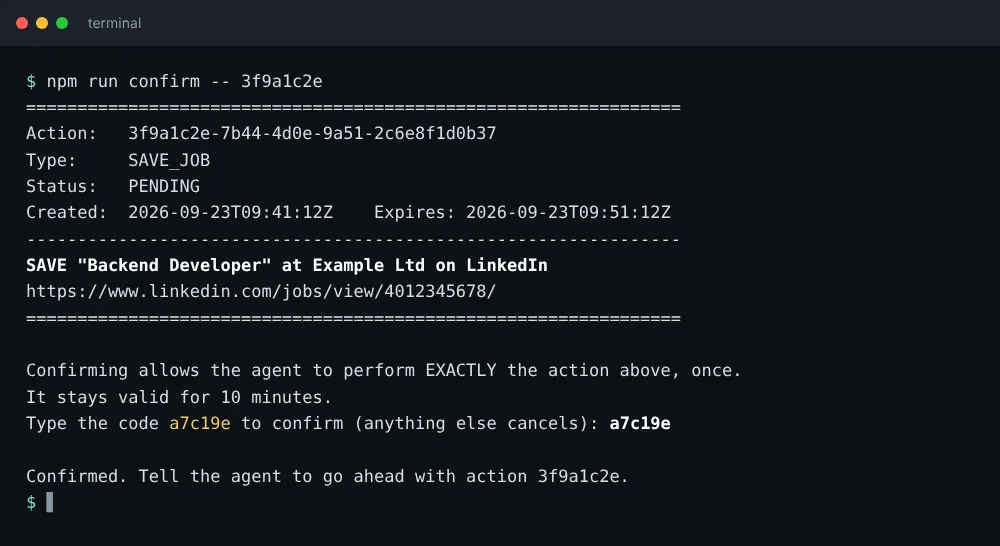
// 3. YOU, in a terminal:  npm run confirm -- 26751bd3      (shows the preview, asks you to type a code)

// 4. agent → linkedin_save_job { "actionId": "26751bd3-…" }   ← COMPLETED (single use)
Confirmation workflow
prepare tool ─► PENDING ──(you: npm run confirm, TTY + code)──► CONFIRMED ──► EXECUTING ──► COMPLETED
     │             │ ▲                                              │            │ ├─► FAILED           (proven: nothing happened)
     │             │ └── payload hash fixed here                    │            │ └─► OUTCOME_UNKNOWN  (ambiguous: never auto-retry)
     │             └─► CANCELLED / EXPIRED                          └─► CANCELLED / EXPIRED (10 min)
     └─ returns actionId + exact preview
- Why out-of-band? The agent calls the tools, so any in-band
confirmed:truecan be forged. See ADR-0004. npm run confirm(list) ·npm run confirm -- <id>(review + confirm) ·-- --cancel <id>·-- --audit <id>·-- --resolve <id> completed|failed(after anOUTCOME_UNKNOWN, once you have checked LinkedIn).- "Apply to good jobs", "go ahead with all of them", or any vague instruction is not a confirmation: each action needs its own confirmation of its exact payload.
Application workflow
Target flow: search → inspect → analyze → prepare_application → (needs_user_input | ready_to_submit) → your review → your confirmation → submit_application.
Implemented today: the guarded core: ApplicationService and the application state machine (DISCOVERED → PREPARING → NEEDS_USER_INPUT ⇄ READY_TO_SUBMIT → CONFIRMED → SUBMITTING → SUBMITTED, plus FAILED, SUBMISSION_UNCERTAIN, EXTERNAL, ABANDONED), with these rules enforced and tested: answers are never fabricated (unknown ⇒ needs_input); READY_TO_SUBMIT is impossible with open questions; external applications are detected and reported, never auto-submitted; SUBMITTED is terminal; an uncertain submission can only be resolved, never retried; the preview format (Job / Company / Position / CV / fields / questions / final action) is built by buildPreview. The user-input-collection + preview half of the tool surface is registered (linkedin_get_application, linkedin_provide_application_answer, linkedin_preview_application, 2026-09-22) — but since nothing yet creates an application with real questions (that is prepare_application, next), these tools have no reachable data on the real account until then; they are unit- and protocol-tested against directly-seeded application state.
Not implemented: the Easy Apply form driver, prepare_application and submit_application. A real signed-in session now exists, but no Easy Apply form has been captured yet; the driver is built from a real, read-only capture of one (see Roadmap), starting with prepare_application, never with submit. They are not exposed as tools.
Persistence
SQLite at ~/.linkedin-agent-mcp/agent.db (WAL). Tables: jobs (unique canonical_key = li:<jobId> for dedupe, first_seen_at, last_seen_at, seen_count, status), job_views, applications, application_answers, profile_changes, messages, actions, audit_events (append-only). Job statuses: discovered, viewed, considering, saved, rejected, preparing, ready_to_submit, submitted, failed, changed only through a transition table. Migrations are forward-only (src/persistence/migrations.ts).
Testing
npm test                       # unit + protocol tests, no network
npm run typecheck
LINKEDIN_E2E=true npx vitest run tests/e2e   # OPT-IN, real account, read-only, see file header
PowerShell: $env:LINKEDIN_E2E="true"; npx vitest run tests/e2e
Profile lock. The E2E suite and the MCP server share one persistent browser profile, and Chrome allows one process per profile. If the MCP server has used the browser recently (any browser-backed tool call, including
linkedin_auth_status), the E2E run fails immediately with "Could not start the chrome browser" until the server closes its idle browser (BROWSER_IDLE_CLOSE_MS, default 5 min). Run E2E with the MCP server disconnected, or wait.
Covers: input validation through the real MCP SDK client; job parsing (synthetic and real captured fixtures); job-ID extraction and canonicalisation; deduplication (in the database and in the service); application, action and job state machines (including forbidden transitions such as SUBMITTED → PREPARING); the full confirmation workflow (unconfirmed, expired, wrong type, tampered payload, single-use, race, hourly limit, non-TTY, wrong code); failure classification (FAILED vs OUTCOME_UNKNOWN) and audit trail; error mapping and leak checks; logger redaction; the consent gate; repository behaviour incl. append-only triggers; and a real spawned stdio server proving stdout carries only JSON-RPC.
Verification status
Honest accounting of what has and has not been exercised.
| Area | Status |
|---|---|
| Build, typecheck, unit + protocol + spawned-stdio tests | ✅ Run, passing |
| Real Chrome launch with persistent profile; consent gate; session probe | ✅ Verified live (signed out) |
Job search parsing on real LinkedIn markup, with location filter and maxResults |
✅ Verified live, signed-out/guest view (React, Java queries) |
| Job detail parsing | ✅ Verified against a captured real signed-out page (fixture) |
Dedupe across separate runs; invalid URL; 404 → JOB_NOT_FOUND; signed-out get_profile/get_company → NOT_AUTHENTICATED; HTTP 999 wall handling |
✅ Verified live / with real captured wall |
| NestJS search | ⚠️ Signed out: LinkedIn returned HTTP 999 (throttling); handling of the 999 itself is verified. ✅ Signed in: verified live alongside React and Java (2026-09-20) |
Logged-in login, session probe, search, job detail, profile (name, headline, location, About, Experience, Education, Skills incl. the /details/ pages) |
✅ Verified live on a real account, 2026-09-20 (tests/e2e, 8/8, read-only). The signed-in layout differs a lot from what was assumed; see ADR-0013 |
Signed-in fixtures job-detail-signedin.html, profile-signedin.html |
⚠️ Modelled on the real markup (structure, hashed classes, componentkey) with invented content; they are regression guards, not raw captures |
Save/Unsave click (prepare → npm run confirm → execute → confirmed via get_saved_jobs, both directions) |
✅ Verified live once, owner present, on a throwaway job, 2026-09-23; the role-based button lookup worked unchanged |
| Grouped multi-role experience entries, company page, Easy Apply | ❌ Not verified on a real account (the test profile has no grouped roles) |
Saved-jobs list (/my-items/saved-jobs/) parsing: entry/company/location split, abbreviated relative dates ("6d ago"), pagination |
✅ Probed live (read-only) 2026-09-22; fixture is modelled, not a capture (real content deleted). get_saved_jobs is registered, unit-tested, and verified live by tests/e2e (2026-09-22) |
npm run confirm interactive success path |
✅ Run by the owner in a real terminal during the Save/Unsave check (2026-09-23). Its logic (ConfirmationService) is also unit-tested, and the non-TTY refusal path was run |
| Easy Apply, submit, messaging, connection requests, profile writes | ⛔ Not implemented |
Limitations
- Selectors will break when LinkedIn changes markup. Failure mode is a typed
LINKEDIN_CHANGED, never fake data;DEBUG_SNAPSHOTS=truesaves the page for a quick fix. - Signed-out pages are throttled by LinkedIn within a few requests (HTTP 999); the intended mode is signed in.
- The signed-in layout has no
<h1>, no stable class names and no<li>in profile lists. It is read through<title>, headings,data-testidandcomponentkeyanchors (ADR-0013); expect these to churn too. linkedin_get_profileis slow by design (main page, lazy-load scrolling, up to three "show all" pages, spaced navigation): tens of seconds. Make sure the MCP client's tool timeout allows it.- The E2E suite and the MCP server cannot use the browser profile at the same time (see Testing).
- In signed-out views an "Apply" button is ambiguous, so
easyApply/applyTypeare reported as unknown. - One browser page at a time; a search returns at most 25 results by design.
node:sqliteis still flagged experimental by Node.- The confirmation model does not protect against something with full shell/database access to your machine.
LinkedIn API limitations
Officially available to any developer: Sign in with LinkedIn (OpenID Connect) and Share on LinkedIn. Job-related APIs (Talent Solutions: Job Posting, Apply Connect, Recruiter System Connect, …) are partner-gated and built for employers/ATS vendors. There is no official API for a job seeker to search jobs, read saved jobs, apply, message, or read their own full profile. LinkedInClient is the seam to swap in an official API if that changes.
Browser automation limitations
Violates LinkedIn ToS §8.2 on its face (see top); subject to bot detection (HTTP 999, CAPTCHA, verification checkpoints: all surfaced as typed errors and never bypassed); DOM churn; sessions expire; needs a real browser installed.
Roadmap
Done: signed-in read-only flows verified live and parsers fixed (2026-09-20, ADR-0013); Chrome-exit-at-launch now classified as a profile lock, not "could not start Chrome" (2026-09-22); get_saved_jobs implemented, unit-tested against a modelled fixture, registered, and verified live by tests/e2e (2026-09-22); user-input-collection + application-preview tools (linkedin_get_application, linkedin_provide_application_answer, linkedin_preview_application) implemented, registered, unit- and protocol-tested (2026-09-22) — built ahead of prepare_application, so not yet reachable on the real account; Save/Unsave verified live end to end with the owner present (2026-09-23).
Next, in order (each gated on live verification, read-only first; the same list with working notes is in CLAUDE.md):
prepare_application: open a real Easy Apply form read-only, detect fields/questions, fill only what the profile/CV/config establishes, stop atneeds_user_input, detect external apply. This is where the agentic logic starts, and the first thing that will actually feed data intolinkedin_get_application/linkedin_provide_application_answer/linkedin_preview_application. Do not start withsubmit_application.submit_applicationwith idempotency checks (inspect LinkedIn's "Applied" state before any retry).- Only then
update_profile,send_message,send_connection_request.
Later: richer job tracking (notes, follow-ups); optional MCP elicitation as a second confirmation channel; PostgreSQL repositories if ever multi-user.
Responsible use
This is for your own account and a small number of deliberate actions. Do not use it to mass-apply, mass-message, mass-connect or harvest data. Do not point it at other people's accounts. Do not add stealth, CAPTCHA solving or rate-limit evasion: when LinkedIn says no (999, checkpoint, CAPTCHA), stop. You are responsible for compliance with LinkedIn's terms and applicable law, and for the accuracy of anything submitted in your name. Never let an agent fabricate answers on applications; the design makes it ask you.
Decision log
Every significant choice, with options considered and an interview soundbite: docs/decisions/ · docs/INTERVIEW.md · npm run decisions.
License
MIT. The licence covers this code only; using it against LinkedIn is still subject to their User Agreement (see Responsible use).
התגובות פתוחות למי שנרשם. הרשמה · כניסה